


需求:
悬浮窗出现繁字按键,点击后页面会变成繁体。
gpt提供了代码,填写后没有出现{繁}的按键。
请问大神,该怎么解决?
按键需要出现在这里,手机跟电脑端都出现
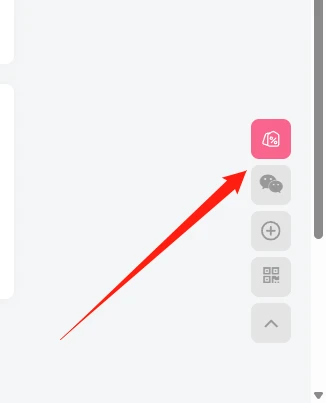
代码为
<!-- 简繁切换按钮 -->
<div id="langSwitch">繁</div>

<script src="https://cdn.jsdelivr.net/npm/opencc-js@1.0.5/dist/umd/full.min.js"></script>

<script>
document.addEventListener("DOMContentLoaded", function(){

    const btn = document.getElementById("langSwitch");
    const article = document.querySelector(".entry-content");

    if(!article) return;

    let current = localStorage.getItem("lang") || "cn";

    function convert(type){
        const converter = OpenCC.Converter({
            from: type === "tw" ? "cn" : "tw",
            to: type
        });

        article.innerHTML = converter(article.innerHTML);
        localStorage.setItem("lang", type);
    }

    if(current === "tw"){
        btn.innerText = "简";
        convert("tw");
    }

    btn.onclick = function(){
        if(current === "cn"){
            convert("tw");
            btn.innerText = "简";
            current = "tw";
        }else{
            location.reload();
            localStorage.setItem("lang","cn");
        }
    };

});
</script>
#langSwitch{
position:fixed;
right:20px;
bottom:160px;
width:42px;
height:42px;
line-height:42px;
text-align:center;
border-radius:50%;
cursor:pointer;
font-size:14px;
font-weight:bold;
color:#fff;
background:linear-gradient(135deg,#6a82fb,#00c6ff);
box-shadow:0 5px 20px rgba(0,0,0,0.2);
z-index:9999;
transition:.3s;
}
#langSwitch:hover{
transform:scale(1.1);
}
/* 子比夜间模式 */
body.dark #langSwitch{
background:linear-gradient(135deg,#ff5e62,#ff9966);
}




![表情[lenghan]-WordPress主题模板-zibll子比主题](https://www.zibll.com/wp-content/themes/zibll/img/smilies/lenghan.gif)